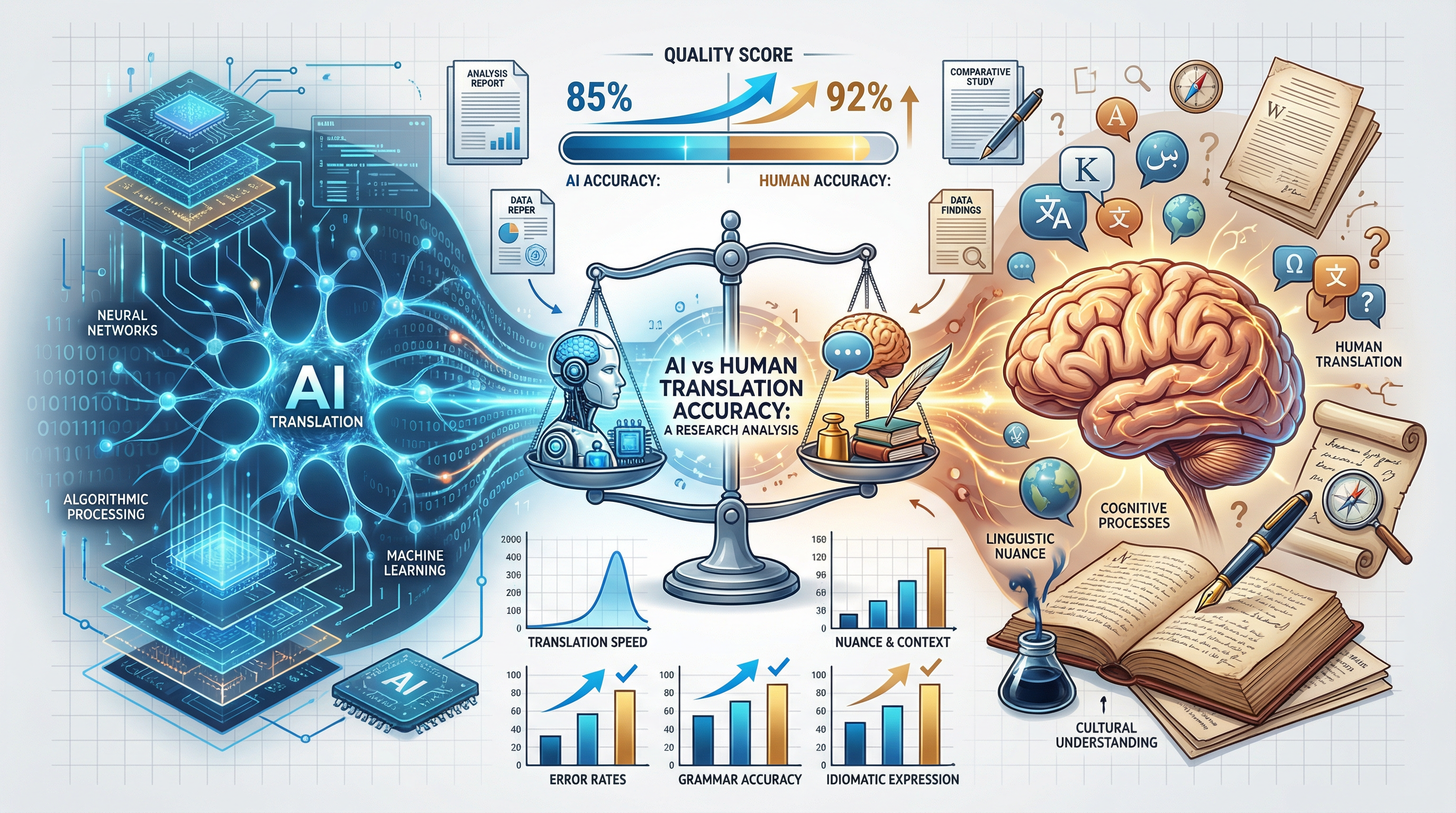
The best AI translation is not just accurate sentence by sentence. For a real business, legal, technical, immigration, or marketing document, the translated file has to come back in the same usable format: the same structure, tables, headings, placeholders, terminology, and layout. That is the difference between chat translation and document translation.
TL;DR: what makes an AI document translation good?
- A good AI translation must be accurate, natural, and faithful to the document's original structure.
- For DOCX, PDF, PPTX, XLSX, HTML, and tagged content, format preservation is part of translation quality, not a design extra.
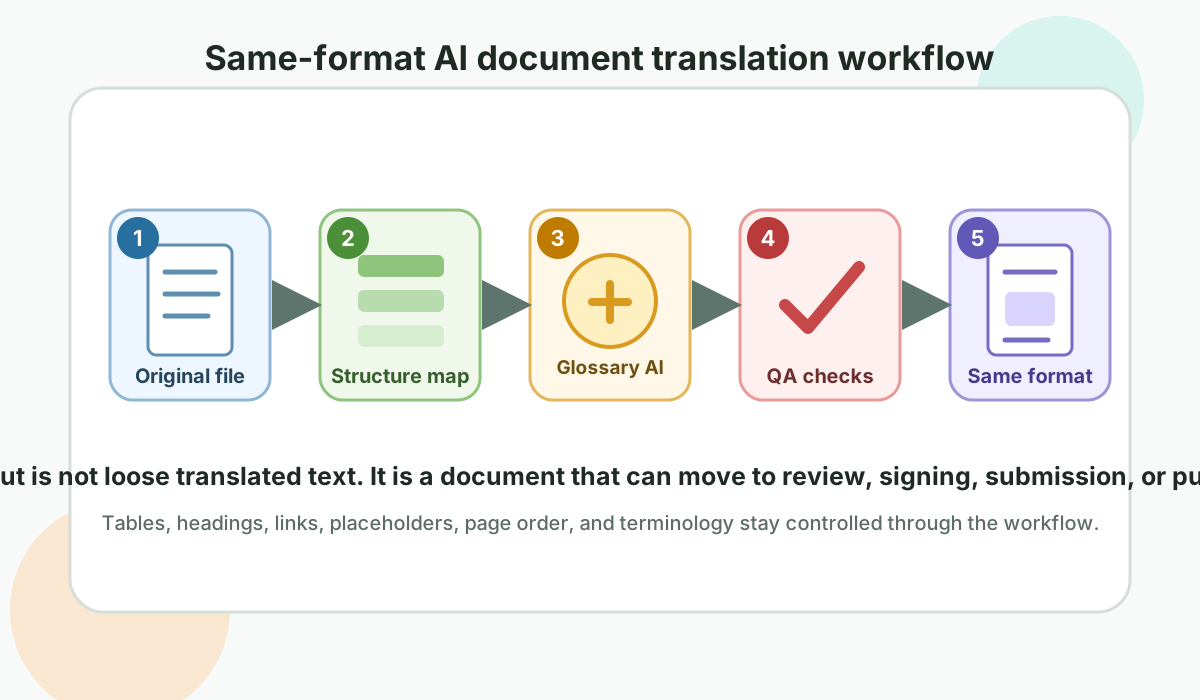
- The best workflow protects tags, variables, tables, numbering, links, page order, glossary terms, and review notes before translation starts.
- Frontier AI models are strong at language, but a document-native workflow is what turns model output into a file that can be submitted, reviewed, signed, published, or sent to a client.
Sentence Translation vs Document Translation
Frontier AI models are excellent at translating isolated text. Give them a paragraph in a chat box and they can often produce fluent, natural output in seconds. But real translation work rarely arrives as clean paragraphs. It arrives as contracts, certificates, spreadsheets, manuals, slides, application forms, websites, and bilingual files with invisible structure.
A translated document is only useful when the receiver can open it, review it, edit it, sign it, submit it, or publish it without rebuilding the file. Accuracy matters, but accuracy alone is not enough if the result destroys tables, drops placeholders, moves links, strips bold text, changes repeated terms from page to page, or returns a wall of copied text when the client expected a finished file.
Professional AI translation therefore has to be judged at two levels. The first level is linguistic quality: did the meaning transfer naturally into the target language? The second level is operational quality: can the translated output move to the next step without manual reconstruction? If either level fails, the translation still creates work for the person who receives it.
What "same format" really means
- Headings, paragraphs, lists, and table cells remain in place.
- Bold, italic, links, placeholders, and inline tags are preserved.
- Variables such as amounts, dates, names, and product codes are not changed.
- Glossary terms stay consistent across the entire file.
- The translated output is returned as a usable document, not loose text.
Why Same-Format Translation Matters
In ordinary text translation, the deliverable is the translated sentence. In document translation, the deliverable is the translated document. That sounds obvious, but it changes the whole quality standard. A translated employment contract is not finished if the clause numbering breaks. A translated product manual is not finished if screenshots no longer match the instructions. A translated financial spreadsheet is not finished if text expansion pushes labels into the wrong cells.
Format is also how readers verify meaning. Headings tell the reviewer where a clause begins. Tables tell a procurement team which price belongs to which item. Page headers identify the version of a document. Signature blocks show who needs to sign. Footnotes, captions, stamps, and marginal notes may carry legal or procedural meaning. When translation breaks those cues, the reader has to spend time deciding whether the text is wrong, the layout is wrong, or both.
This is especially important for cross-border work. A document may pass through a translator, project manager, client reviewer, government officer, lawyer, designer, printer, or software engineer. Each person expects the same file to remain usable. A same-format translation reduces handoff friction because the file still behaves like the original.
| If formatting breaks | What the client actually feels |
|---|---|
| Table columns shift | The reviewer cannot trust that each value belongs to the right field. |
| Clause numbering resets | Legal review slows down because references no longer line up. |
| Placeholders are translated | Software, templates, or mail-merge documents can fail in production. |
| Headers and footers disappear | Version control, page identity, and authority checks become harder. |
| The output is loose text | Someone still has to rebuild the document manually before it can be used. |
File Types That Need More Than Plain AI Translation
A chat box can translate a paragraph. A document translation workflow has to understand the file type. Each format carries its own traps, and each one needs a slightly different preservation strategy.
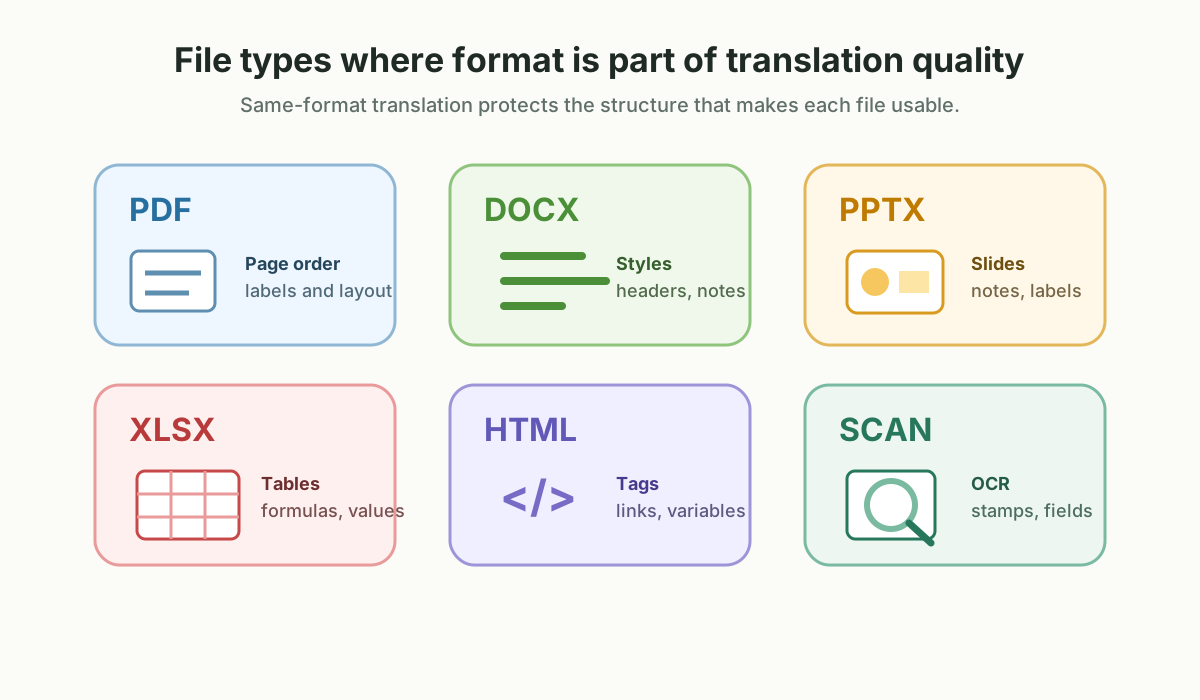
PDF translation
PDFs can be text-based, scanned, flattened, layered, or created from design software. A good workflow must detect whether OCR is needed, preserve page order, keep visible labels near the right objects, and avoid forcing translated text into spaces that are too small.
Word document translation
DOCX files often contain styles, numbering, comments, tracked changes, headers, footers, footnotes, tables, and fields. The translation has to preserve the document's editing behavior, not only the visible text on the page.
PowerPoint translation
PPTX translation is sensitive to text expansion. A natural German, Spanish, or Malay phrase may be longer than the English source. The workflow must protect slide hierarchy, speaker notes, labels, charts, and visual balance.
Spreadsheet translation
XLSX files mix text, formulas, hidden sheets, validation rules, and numeric formats. A translation workflow must avoid changing formulas, dates, currencies, product codes, and references while still translating labels and instructions.
HTML, XML, and app strings
Web and software content contains tags, variables, ICU placeholders, links, and keys. The translated text must read naturally while keeping every structural marker intact, because a small placeholder mistake can break a screen.
Official certificates and forms
Birth certificates, marriage certificates, academic transcripts, visa documents, and company records depend on labels, stamps, seals, and field order. The translated document must be easy for an authority or officer to compare against the original.
Design and marketing files
Brochures, campaign decks, product sheets, and pitch material need tone and visual fit. A translation may be linguistically correct but still fail if it overflows boxes, breaks rhythm, or makes the page look unfinished.
What We Benchmarked
We ran a 24-language translation benchmark across legal, marketing, technical, idiomatic, UI, and tagged document segments. The benchmark used a blind three-judge panel and compared six frontier model families: Gemini, Claude, GPT, Qwen, DeepSeek, and Mistral.
The overall scores were close at the top: Gemini averaged 4.73 out of 5, Qwen 4.70, GPT 4.70, Claude 4.56, DeepSeek 4.42, and Mistral 3.94. The headline is not that one model wins everywhere. The important finding is that the best model changes by language, and document constraints change what "best" means.
The tagged document segments were important because they exposed failures that a simple fluency score can hide. A model can produce a beautiful sentence and still damage the deliverable by changing an HTML tag, translating a variable name, dropping a placeholder, or making the same legal term appear in several different forms. For professional document work, those are not minor formatting defects. They are quality defects.
| Signal | What it tells us |
|---|---|
| Language winners differ | No single frontier model is best for every target language. |
| Tagged segments matter | A translation can read well and still fail if it damages inline document tags. |
| Domain context helps differently | Glossary and translation memory improve control more than they guarantee a large score jump. |
What Frontier Models Do Well, and Where They Still Need a Workflow
Modern frontier models are impressive because they can handle tone, context, idioms, and sentence-level nuance better than older machine translation systems. They can often explain why one translation sounds more formal than another. They can adapt a message for a legal, medical, sales, or customer-support context. They can also produce more natural phrasing in languages where literal translation sounds stiff.
But a document is not just a language problem. It is a file-handling problem, a terminology problem, a review problem, and often a compliance problem. The model may know what the sentence means, but it does not automatically know which pieces of the file are translatable, which pieces are structural, which terms are already approved by the client, and which fields should remain unchanged.
| Need | Chat-style AI translation | Document-native AI translation |
|---|---|---|
| Quick meaning check | Usually enough | Also possible, but may be more than needed |
| Return a usable file | Often requires manual rebuilding | Designed for same-format output |
| Protect placeholders and tags | Possible, but fragile | Protected before translation |
| Keep terminology consistent | Depends on prompt length and model memory | Uses glossary and translation memory |
| Human review handoff | Reviewer may need to compare manually | Reviewer can work from the structured output |
Why Natural Expression Is Not Enough
Natural expression is important. A legal Japanese sentence should not read like English grammar wearing Japanese words. A Malay employment contract should use formal legal Bahasa Malaysia, not casual phrasing. A Chinese business document should sound like a document, not a chat reply.
But professional translation has another layer: controlled naturalness. The output must be fluent while still obeying the document. That means the AI cannot simply choose the prettiest phrase each time. It must respect the file structure, the client glossary, approved past translations, and the accepting authority's requirements.
The tension is easiest to see in formal documents. A translator may know three natural ways to express the same concept, but only one may match a statute, a company glossary, a product manual, or a previously approved certificate. In legal and official translation, natural does not mean casual. In marketing translation, natural does not mean rewriting the offer until the layout no longer fits. In software translation, natural does not mean replacing product terms that must stay consistent across the interface.
Natural but controlled translation looks for balance
- It avoids literal phrasing that sounds foreign in the target language.
- It keeps legally or commercially important terms consistent.
- It respects the source document's hierarchy and intent.
- It does not over-localize official names, numbers, codes, or references.
- It gives human reviewers a stable file, not a loose rewrite.
Common AI Document Translation Failures
Many AI translation failures are not dramatic mistranslations. They are small structural errors that accumulate until the file becomes unreliable. These are the issues we watch for when evaluating whether an AI translation workflow is ready for real document delivery.
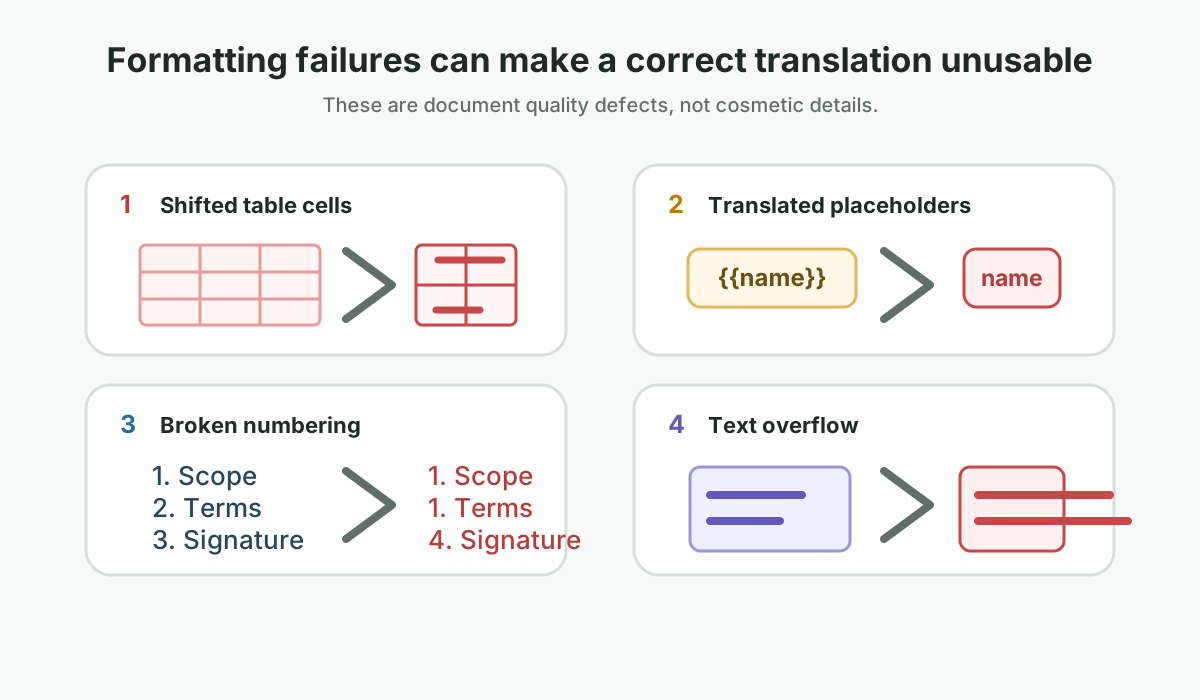
1. Variables and placeholders get translated
A source string with a customer-name variable must keep the variable intact. If the AI translates the variable name, removes the braces, or changes spacing around it, the software template may fail. The same applies to invoice fields, mail-merge tags, product SKUs, and CRM placeholders.
2. Tables preserve text but lose meaning
A table can look visually similar while still being wrong. If a translated label wraps into the next row, if columns become too narrow, or if a header is separated from its values, the reader may connect the wrong number, date, or condition to the wrong field.
3. Text expansion breaks the layout
Some languages need more space than the source language. Others need different line-breaking behavior. A translation workflow has to anticipate expansion in buttons, slide titles, certificates, narrow table cells, and PDF labels. Otherwise, natural language becomes a layout problem.
4. Right-to-left and complex scripts are treated like English
Arabic, Urdu, Hebrew, Thai, Khmer, Hindi, and Tamil are not just different word lists. They involve script shaping, line breaks, directionality, spacing, and punctuation behavior that can expose weak document handling. A same-format workflow must preserve the document while respecting the script.
5. The same term is translated several ways
In a casual paragraph, variation can sound elegant. In a contract, manual, policy, or interface, variation can create confusion. If "licensed representative" becomes three different phrases across a file, the reviewer has to decide whether the meaning changed.
Where Pikka AI Fits
Pikka AI is designed around document translation rather than chat translation. Its role is not just to ask a model to translate. It prepares the document, protects structural markers, injects terminology and domain context, routes languages to suitable models, and returns a translated file that keeps the original working format.
In our domain test, Pikka AI's context layer produced a modest lift: 4.60 versus 4.53 for the same lean model without context. That is not a dramatic headline, and we should not pretend it is. The more important product value is that the system makes translation behave like a document workflow: consistent terms, preserved structure, and output that can move to review or delivery without manual reconstruction.
The practical difference is that Pikka AI treats the model as one part of the translation system, not the whole system. Before a segment reaches the model, the workflow can identify structural markers, isolate protected text, add domain context, and apply the right terminology constraints. After translation, the workflow can check whether protected markers are still present, whether the output has drifted from the expected structure, and whether the translated file is suitable for human review.
Chat-style AI translation
- Good for quick text understanding
- Often fluent on short passages
- Requires copy and paste
- Does not guarantee file structure
- May vary terminology across segments
Document-native AI translation
- Built for DOCX, XLSX, PPTX, HTML, and bilingual formats
- Preserves placeholders and inline tags
- Uses glossary and translation memory
- Returns a file, not just translated text
- Supports human review in a real workflow
What to Ask Before Choosing an AI Translation Workflow
If you are comparing AI translation options, do not only ask which model is being used. A strong model is valuable, but the workflow around the model determines whether the output is usable. The better question is: what happens to my document before, during, and after translation?
| Question | Why it matters |
|---|---|
| Will I receive a translated file or only translated text? | A file saves layout rebuilding and review time. |
| How are tags, variables, and numbers protected? | These elements are easy to damage and expensive to find later. |
| Can approved terminology be reused? | Glossary and translation memory reduce inconsistency across large documents. |
| Can a human reviewer edit the output? | Critical documents often need human confirmation even when AI does the first pass. |
| Does the workflow support my target language and script? | Arabic, Thai, Khmer, Hindi, Tamil, Chinese, Japanese, and Korean all surface different layout issues. |
Format Is a Quality Metric
In a document translation workflow, formatting is not cosmetic. It is part of the deliverable. A translated contract with broken numbering can create legal review risk. A translated spreadsheet with shifted cells can break a financial model. A translated website string that loses placeholders can break production UI. A translated certificate with layout drift can be harder for an officer to verify.
This is why we treat file preservation as a translation quality issue. A model can score highly for fluency and still create operational work if the document has to be rebuilt by hand.
When Human Review Still Matters
Same-format AI translation is not a promise that every document can skip human review. It is a way to make the first pass more useful and to reduce avoidable reconstruction work. For low-risk internal documents, a high-quality AI output may be enough for understanding. For contracts, immigration papers, public marketing assets, medical documents, tender submissions, and official certificates, human review is still a sensible control.
Human reviewers add judgment that a model cannot reliably guarantee: whether a term matches local practice, whether an authority expects a particular wording, whether a sentence is too direct for the target culture, whether a formatting change affects interpretation, and whether the translated file is appropriate for its final use. The best workflow is not AI instead of people. It is AI doing the repetitive first-pass work while people focus on risk, nuance, and approval.
A practical review rule
If the document affects rights, money, compliance, immigration, employment, medicine, safety, brand reputation, or a public filing, use AI to accelerate the workflow, but keep a qualified human review step before delivery.
How to Prepare Documents for Better AI Translation
The quality of AI document translation improves when the source file is prepared well. This does not mean simplifying the document until it loses its purpose. It means removing avoidable ambiguity before translation begins.
- Provide editable source files when possible. A clean DOCX, XLSX, PPTX, HTML, or source design file is usually easier to preserve than a flattened or scanned PDF.
- Tell the translator the final use. A translation for internal understanding can be lighter than a translation for court, visa submission, publication, or client delivery.
- Share approved terminology. Product names, role titles, legal terms, brand phrases, and previous translations help the system avoid inconsistent choices.
- Mark what should not be translated. Names, reference numbers, codes, URLs, template variables, and official labels may need to remain unchanged.
- Separate final and draft content. Remove comments or hidden notes that should not enter the translated deliverable, or make clear whether they need to be translated.
- Plan for text expansion. Slides, forms, buttons, labels, and narrow table cells may need layout adjustment after translation, especially across language families.
Best Use Cases for Same-Format AI Translation
Same-format AI translation is most valuable when the cost of rebuilding the document is high. If a file is plain text, the benefit is mostly speed and fluency. If the file has layout, structure, repeated terminology, or review requirements, format preservation can save hours.
Legal teams
Contracts, policies, affidavits, exhibits, and bilingual review packs where numbering and terms must remain stable.
HR and immigration
Employment letters, payslips, certificates, academic records, visa support documents, and application forms.
Technical teams
Manuals, safety sheets, SOPs, product specifications, UI strings, and tagged documentation.
Marketing teams
Brochures, landing pages, presentation decks, product one-pagers, and multilingual campaign assets.
Finance teams
Reports, invoices, spreadsheets, tender tables, and financial notes where numbers and labels must not drift.
Operations teams
Training material, onboarding documents, safety notices, vendor forms, and process documents used across regions.
Related Translife Workflows
Different documents need different levels of control. If the file only needs fast understanding, AI-assisted translation may be enough. If the output will be filed, signed, published, or used in a regulated setting, combine AI speed with professional review and delivery checks.
- Document translation for business, academic, legal, technical, and official files.
- Certified translation for immigration, court, embassy, and authority-facing documents.
- Technical translation for manuals, specifications, safety documents, and product content.
- Website translation for multilingual web pages, HTML content, and localization workflows.
- Legal translation for contracts, agreements, policies, and formal legal documents.
FAQ: AI Translation That Keeps the Same Format
Can AI translate a PDF and keep the same formatting?
Yes, but the result depends on the PDF. A text-based PDF is easier to preserve than a scanned, flattened, or heavily designed PDF. The best workflow detects the document type, applies OCR when needed, protects layout structure, and then rebuilds the translated output for review.
Is ChatGPT enough for document translation?
ChatGPT and other frontier models can be very useful for quick text translation, rewriting, and understanding. They are not always enough when you need a same-format deliverable with tables, tags, placeholders, comments, glossary terms, and file output preserved.
What is the difference between AI translation and professional translation?
AI translation can produce a fast first draft and can be excellent for many routine documents. Professional translation adds human judgment, terminology control, purpose-specific review, certification when required, and accountability for documents where mistakes carry risk.
Why do tables and bullet lists break after translation?
Tables and lists often break because translated text is longer or uses different line-breaking rules than the source language. If the workflow only translates text and does not manage layout constraints, the result may overflow, wrap badly, or push nearby content out of place.
Can AI translation handle Arabic, Thai, Khmer, Hindi, and Tamil?
AI can translate these languages, but the document workflow has to handle script-specific layout issues. Arabic introduces right-to-left directionality. Thai and Khmer need careful line breaking. Hindi and Tamil require correct script shaping and spacing. A same-format system should test the file after translation, not only the sentence quality.
When should I use human review after AI translation?
Use human review when the document affects legal rights, immigration, finance, safety, employment, medicine, brand reputation, public publication, or official submission. AI can accelerate the process, but human review gives the final document a stronger quality and risk control layer.
Practical Takeaway
If you only need to understand a sentence, a frontier AI model in a chat window may be enough. If you need to deliver a translated document, the question changes. You should ask whether the system can preserve format, route languages intelligently, reuse approved terminology, and return a document that is ready for review.
That is the standard we are building toward: AI translation that is accurate, natural, controlled, and delivered in the same usable format.
Need AI-assisted document translation?
Translife supports professional translation workflows for business, legal, technical, and official documents where format fidelity matters.
Discuss your document